

To transfer Iqama (نقل كفاله) sponsorship to Saudi Arabia, expatriates must follow a lengthy procedure, explained below. According to Article 39 of Saudi Labor Law, a foreign employee is not permitted to work for anyone other than their Kafeel (sponsor).
Note: In accordance with new sponsorship transfer regulations in Saudi Arabia, employee transfer services for expatriate workers are now conducted through the Qiwa platform. Here is a step-by-step guide for expatriates wishing to change jobs in Saudi Arabia. To get all the latest news, please join our Telegram group. CLICK HERE
Step 1: Upload the employment contract to Qiwa
If the new employer meets the following 5 conditions, they will create a request to transfer the employee's services via the Qiwa platform by uploading the employment contract.
Qiwa State: Awaiting worker approval.

6 Conditions for downloading the employment contract on Qiwa:
- Eligible to obtain a new visa in accordance with regulations.
- The employee has been residing in Saudi Arabia for at least one year.
- At least 80 % compliance with the wage protection system in the last 3 months.
- The profession of the holder of the "iqama" corresponds to the activities of the employer.
- Maximum limit for workers of certain nationalities on Qiwa.
- Nitaqat status = Green.
Step 2: Accepting the job offer on Qiwa
To accept a job offer or employment contract on the Qiwa platform within 10 days of its creation:
- Register on the Qiwa platform.
- Log in to your individual account on Qiwa https://auth.qiwa.sa/en/sign-in
- Click on «Individual Account».
- Scroll down the page and click on "Employee Transfer".
- On the next page, click on "View the contract".
- Read the employment contract carefully before accepting it on Qiwa.
- After acceptance, it will be your only legally binding contract in the eyes of the Ministry of Human Resources and the Saudi government.
- Accept the terms and conditions.
- Accept or reject the contract.
- If you encounter a problem accepting the request, you can: send an email to support@qiwa.sa Call the Qiwa helpline: 920000105 to accept a job offer/employment contract on Qiwa

Step 3: Awaiting the end of the notice period
Once the employee's transfer request is accepted by the employee on Qiwa, the employee's notice period will begin on Qiwa.
Qiwa status: Awaiting completion of the notice period. Employee transfer status on Qiwa: Awaiting completion of the notice period.

Step 4: Acceptance by the current employer
The request will be sent to the current employer for approval or rejection. The current employer has 5 options at this stage:
- Accept the request immediately.
- Accept the request with a default notice period of 90 days.
- Accept the request with a reduced notice period of less than 90 days.
- Reject the request.
- Leave the request as it is.
Qiwa State: Awaiting approval from current employer.

Qiwa State: Awaiting approval from current employer.
Acceptance: The employee will be transferred if:
The current employer accepts the request within 14 days or; The system automatically accepts the employee's transfer request without Kafeel (sponsor) approval.
Qiwa status: Approved. Employee transfer status to Qiwa: Approved.
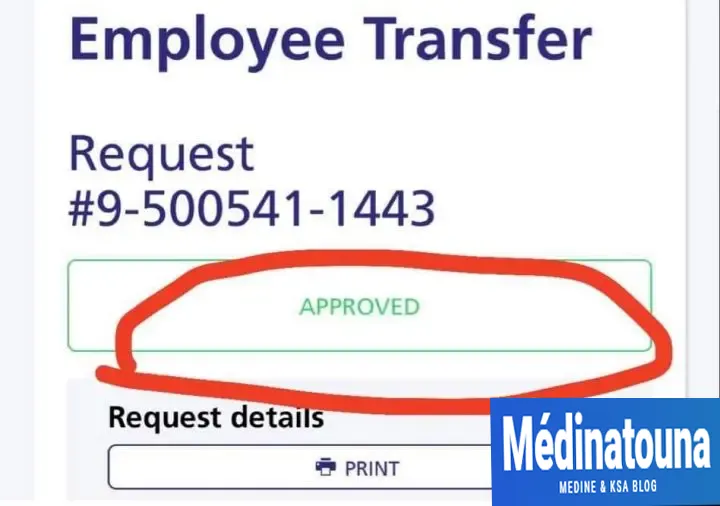
Automatic cancellation: If the current employer does not accept the request within 14 days, the employee transfer request on Qiwa will be automatically cancelled.
Qiwa status: Automatically cancelled due to the lack of approval or rejection of the application for more than 14 days.

Rejection: If the current employer rejects an employee's request for a transfer of service, they must provide a justification for this, for example, an incomplete employment contract.
Qiwa State: Rejected by current employer. Qiwa State: Rejected by current employer.

Remaining notice period:
If Qiwa starts displaying the counter of the number of days remaining, this means that the request has been accepted by the employer and that the transfer will take effect after the end of the notice period.

Step 5: Awaiting completion of the transfer to Absher by the new employer
Once the request is approved by the current employer and the notice period is over (if applicable), the employee transfer service on Qiwa will display the following status: pending completion of transfer to Absher by the new employer.
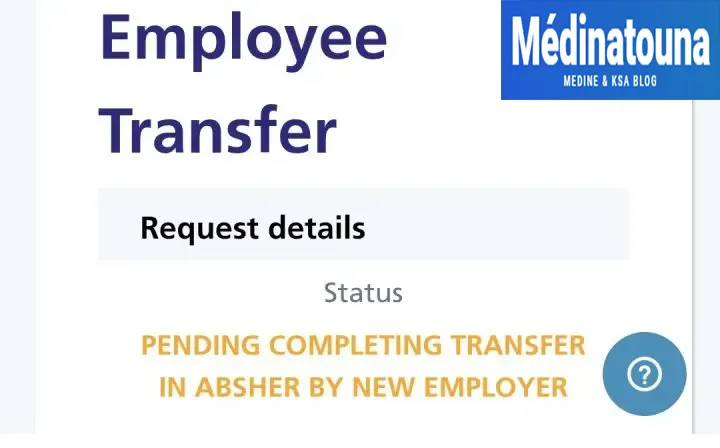
While awaiting completion of the transfer on Absher by the new employer, the new employer is required to pay the Iqama transfer fee and log into their Absher account to initiate the company change or employee transfer request within 24 days. If the request is not initiated within 24 days, the entire process will be canceled, and the system will display a message.
Qiwa State: Expired due to the new employer's failure to complete the application. Employee transfer to Qiwa

Step 6: Print the new Iqama
Once the employee transfer request is accepted by the current employer on the Qiwa platform;
Pay the Iqama sponsorship transfer fee within 12 days of application acceptance to finalize the process with the Jawazat.
According to Article 40 of the Saudi Labor Law, the employer is responsible for paying the fees. Once the transfer is complete, you can verify the name of your new Kafeel (sponsor) on Absher. After that, you can go to any Jawazat office to have your new Iqama printed.