

You can now open a current or savings account with Bank Al Rajhi online using their mobile application, with minimal documentation required.
Requirements
To submit an application to open an account, the following conditions must be met:
- A valid Iqama.
- An active Absher account.
- A valid national address registration.
- A valid mobile phone number.
- Passport number.
Open an online account with Al Rajhi Bank
To open a new Al Rajhi online account in Saudi Arabia:
- Visit https://eservice.alrajhibank.com.sa/AOW?Lang=EN.
- Click on "Proceed to opening a web account".
- Accept the terms and conditions.
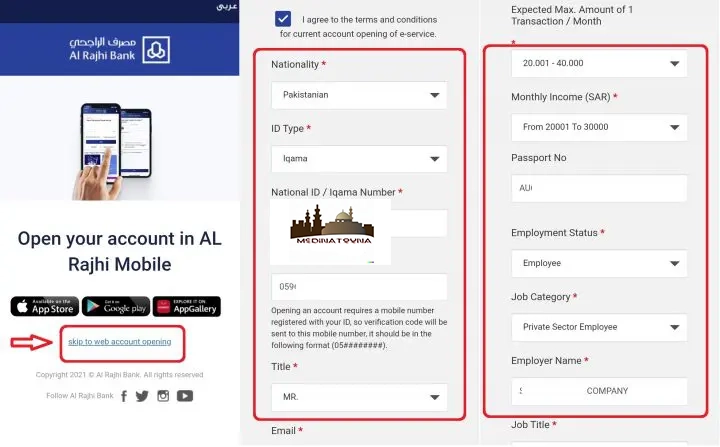
Step 1: Iqama Details
- Select the nationality.
- ID type: Iqama.
- Enter the mobile phone number.
- Select the title.
Step 2: Job Details
- Expected transaction amount: Gross salary.
- Monthly income: Gross salary.
- Passport number: Enter the passport number.
- Employment status: Employee.
- Job category: Private sector employee.
- Employer name: Kafeel's full name.
Step 3: Personal Information
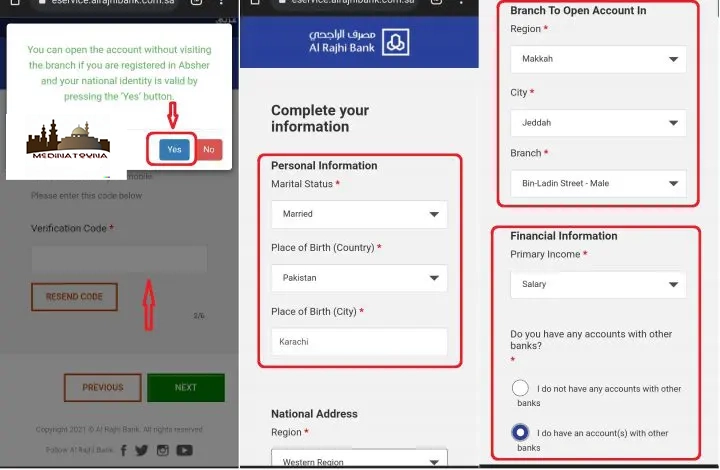
At this stage of the online account opening process with Al Rajhi Bank, a pop-up window will appear:
- Click on "Yes".
- Enter the verification code sent to your mobile phone.
- Select the marital status.
- Select the place of birth.
- Enter your registered national address.
- Enter the address in your country of origin.
- Select the branch where you wish to open the account.
Step 4: Financial Information
When filling out the online form to open an account with Al Rajhi Bank, the system will request certain financial information:
- Main income: Salary.
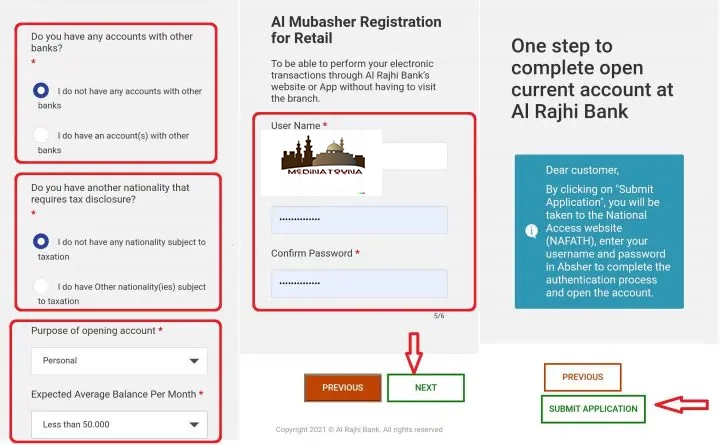
- Do you have accounts in other banks: Yes/No.
- Add account details if the answer is Yes.
- Do you have another nationality? Yes/No.
- Purpose of opening the account: Personal.
- Average expected monthly balance: Gross salary x 3.
Step 5: Authentication
You will now need to enter your username and password for your online banking.
- On the next page, click on "Submit Application".
- The system will direct you to the Nifaz website.
- Enter your Absher username and password to authenticate.
- You can visit any branch to collect your ATM card.
Congratulations! You have successfully opened a new online account with Al Rajhi Bank
To get all the latest news, please join our Telegram group. CLICK HERE