
You can check your electricity bill and its history online in Saudi Arabia by registering your account with the SEC, but also without registering. Here's how.
SEC: Saudi Electric Company.
Check your electricity bill in Saudi Arabia without registering.
You can check your electricity bill in Saudi Arabia without registering using the SEC's WhatsApp service. To do so:
- Send a message to +966920001100.
- Write "2" for English.
- Send "1" to view my invoice.
- Write down the electricity account number.
- The SEC will send you the amount due to pay.

Check your electricity bill in Saudi Arabia without registering.
Check your electricity bill in Saudi Arabia via SMS. To receive your monthly electricity bill online via SMS on your mobile phone:
- Write #9 followed by the account number and send it to 500120. Example: #9 30036167368 to 500120.
To change your electricity bill via SMS on your mobile phone:
- Write #1 followed by the account number and send it to 500120.
To stop receiving electricity bills via SMS on your mobile phone:
- Write #2 followed by the account number and send it to 500120.

Receive the electricity bill by email.
You can also receive your electricity bill by email so you can check it as soon as it's generated. To do this:
- Open the SEC website.
- Enter your electricity bill account number.
- Enter your email address.
- Language: English.
- Click on the "Register" button.
- Click on "Cancel subscription" to cancel the alerts.
- Click on the email you received to activate it.

You will now start receiving your electricity bill in your email. On the electricity bill received online, you can check the history for the last 12 months.
Register your account with the SEC. If you frequently check your electricity bill and its history online, it's best to register with the Saudi Electricity Company. To do so:
- Open the SEC website.
- Click on the "Register" button.
- Select "Individual" from the menu.
- Click the "Start" button.
- Select your nationality.
- Type of identity document: Iqama number.
- Date of birth according to the Iqama.
- The SEC system will send a verification code to the mobile phone number registered with Absher to finalize the registration process.

Register your account with the SEC.
Now you need to add your account number. To do this:
- Log in to your account on the SEC website.
- Click on "Declare now".
- Click the "Start" button.
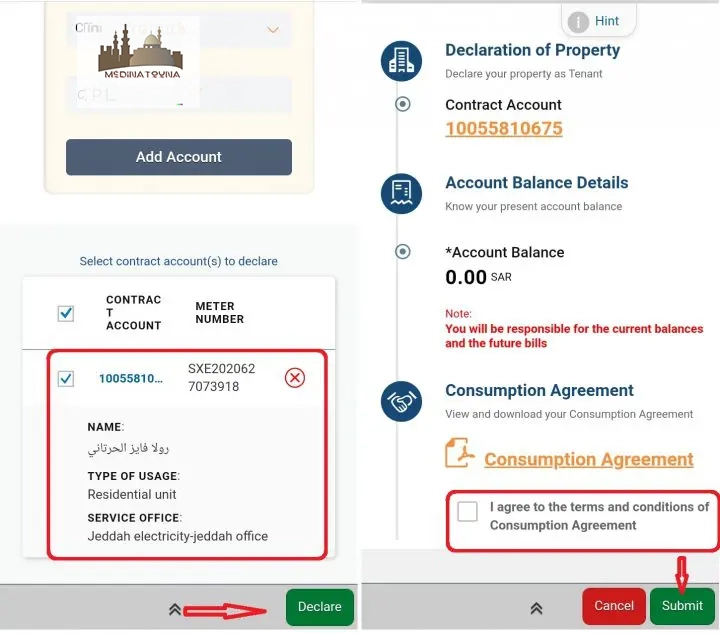
- Enter the contract account number.
- Select "Add an account".

The system will display the electricity account details.
- Click on "Declare".
- Accept the terms and conditions.
- Click the "Submit" button.
Check your electricity bill history online.
Once the invoice has been successfully added to your account, you can review the invoice history for the last 3 years. To do so:
- Log in to your account on the SEC website.
- Select "My invoices" from the menu.
- Click on your electricity bill.
- Select "Bill History" to check your electricity bill history online.

You can also check the invoice payment history.

Here you can find your electricity bill history and payment history. To get all the latest news, please join our Telegram group. CLICK HERE