
If you wish to visit Jawazat for any reason, whether it be to obtain an Iqama for a newborn or for Naqal Maloomat, you must make an appointment with Jawazat through Absher. Here is the procedure to follow.
Make an appointment with Jawazat
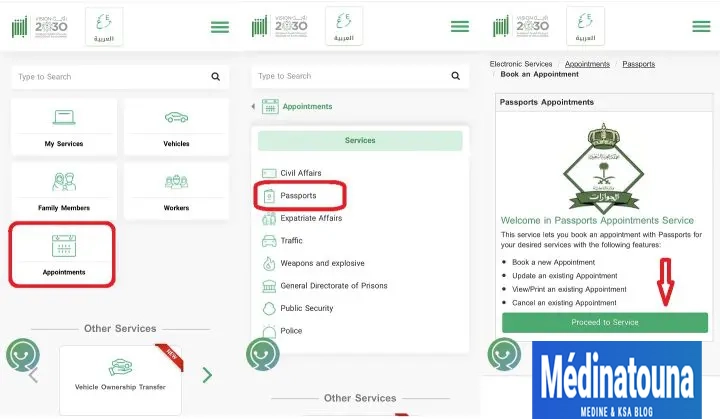
- Log in to your Absher account at the address https://www.absher.sa/
- Scroll down and click on the "Appointments" tab.
- Select the "Passport" option.
- Click the "Proceed to service" button.
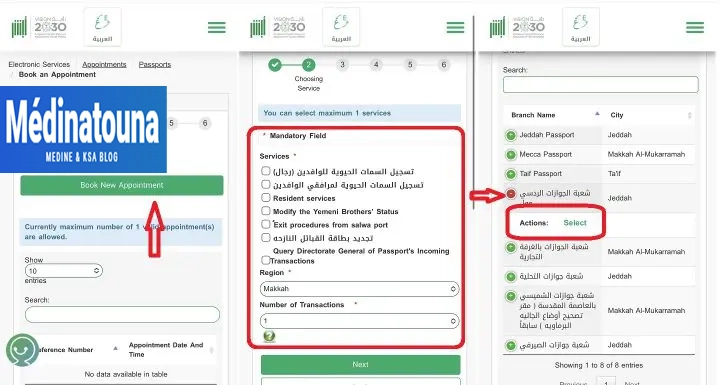
- On the new page for booking an appointment at Jawazat, click on the "New appointment" button.
Types of appointments
Select a service from the following options:
- تسجيل السمات الحيوية للوافدين (رجال): Fingerprints of men. تسجيل السمات الحيوية لمرافقي
- الوافدين : Fingerprints of dependents.
- Resident services = All other services, including Naqal Maloomat, Iqama for newborns, etc.
- Change the status of Yemenis.
- Procedures for leaving the port of Salwa for Qatar with a visa on arrival.
- تجديد بطاقة القبائل النازحه = Renewal of the card for internally displaced persons.
- Querying incoming transactions from the General Directorate of Passports = If the exit from or entry into Saudi Arabia is not updated in the Jawazat system.
Region: Select the region.
Number of transactions: The number of tasks you wish to perform.
Select the Jawazat office you wish to visit.
To get all the latest news, please join our Telegram group. CLICK HERE
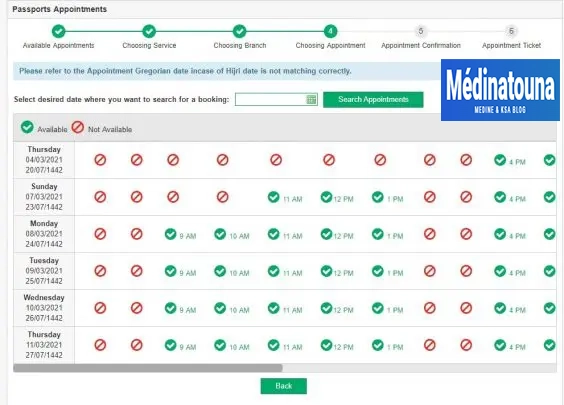
On the next page, select the time and date of the appointment.
Available time slots: Green.
Reserved time slots: Red.
Check the date and time, then click the "Confirm appointment details" button.
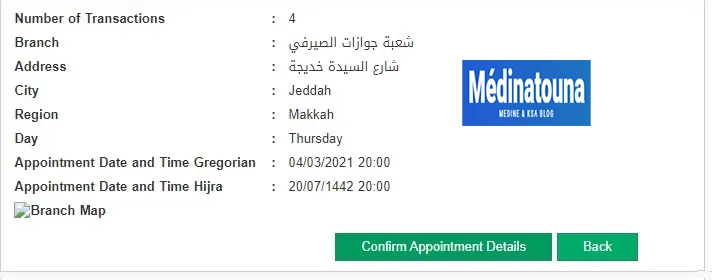
Congratulations, you have successfully booked an appointment with Jawazat via Absher. Simply print the appointment confirmation or save the screenshot to your phone.
Print your proof of appointment
Change the appointment with Jawazat
If you've changed your mind, you can modify the date, time, or service of your appointment via Absher. Here's how:
- Log in to your Absher account at the address https://www.absher.sa/
- Scroll down and click on the "Appointments" tab.
- Select the "Passport" option.
- Click the "Proceed to service" button.
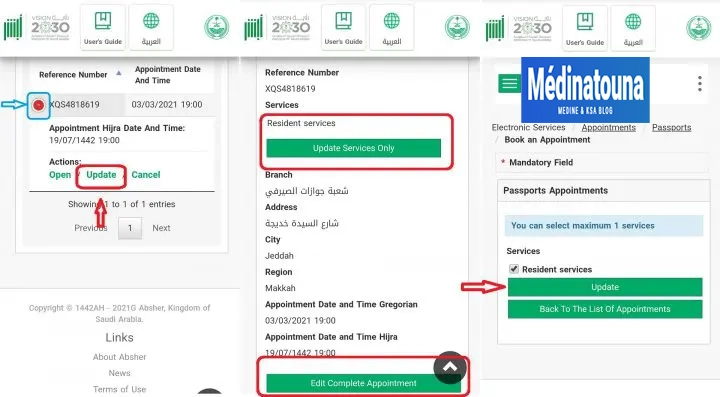
- Click on the (+) sign. Select the "Edit" option.
- Now click on the "Edit full appointment" button.
- Select the new service, date and time to update your appointment with Jawazat.
Cancel the appointment with Jawazat
If you cannot make it to the passport office on the specified date and time, it is best to cancel your appointment. Here's how:
- Log in to your Absher account at the address https://www.absher.sa/
- Scroll down and click on the "Appointments" tab.
- Select the "Passport" option.
- Click the "Proceed to service" button.
- Click on the (+) sign.
- Select the "Cancel" option.
- Click the "Confirm cancellation" button.
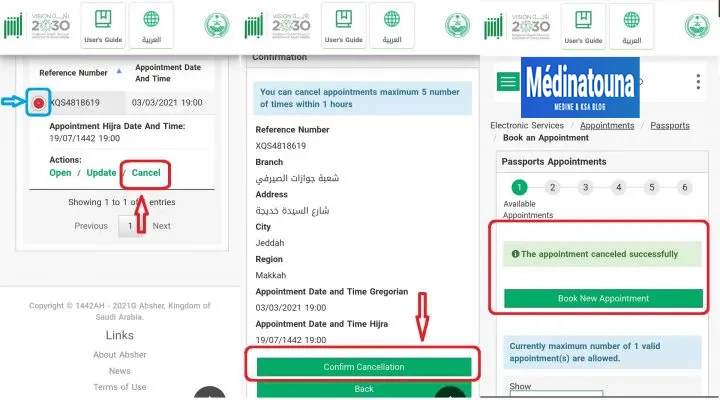
That's it, you have successfully cancelled your appointment with Jawazat.