Updated 2026. Qiwa is the Ministry of Human Resources and Social Development's (MHRSD) platform where your contracts, work permit, and employment status are stored. Good news: in 2026, registration was simplified and is now done through Nafath. Here's how to proceed, what you can do, and most importantly... solutions to the most frequent blockages reported by users. The Ministry of Human Resources has launched the Qiwa platform for expatriates working in Saudi Arabia. Every expatriate working in Saudi Arabia must register an account on the Qiwa platform to benefit from 85 different services.
Key takeaway (30 seconds)
- In 2026, Qiwa passwords are no longer created: users log in via Nafath (national digital identity) or Absher.
- For most expatriates, the The individual account is already pre-activated. (related to your iqama). "Registering" mainly means log in the first time and to complete his profile.
- Prerequisites : a valid iqama, an account Active Absher and the application Nafath installed and linked to your iqama.
- Use only the official portal qiwa.sa. The old Qiwa app was removed from the Play Store in 2024, and fake apps circulate.
- The most common blockages (connection loop, blocked account, access from abroad) have simple solutions, detailed below.
Why register on Qiwa (and why it's important in 2026)
Qiwa became the central point of your professional life in the Kingdom. This is where you can consult and accept your contract (Only a contract documented on Qiwa is legally recognized), follow the validity of your work permit, manage a employer transfer and access dozens of ministry services.
This is all the more crucial since 2026: a work permit left expired for more than 3 months can lead to your radiation from the company register (see our dedicated article). Having an active Qiwa account means you can verify all of this yourself.
🔗 Read next: How to check your employment contract on Qiwa.
Prerequisites before starting
- A valid iqama (residence number).
- A active Absher account (the gateway to government services).
- The application Nafath installed on your phone and related to your iqama. She is the one who validates your identity.
💡 Most of the data is automatically retrieved from government systems. You normally don't have No documents to upload during standard registration.
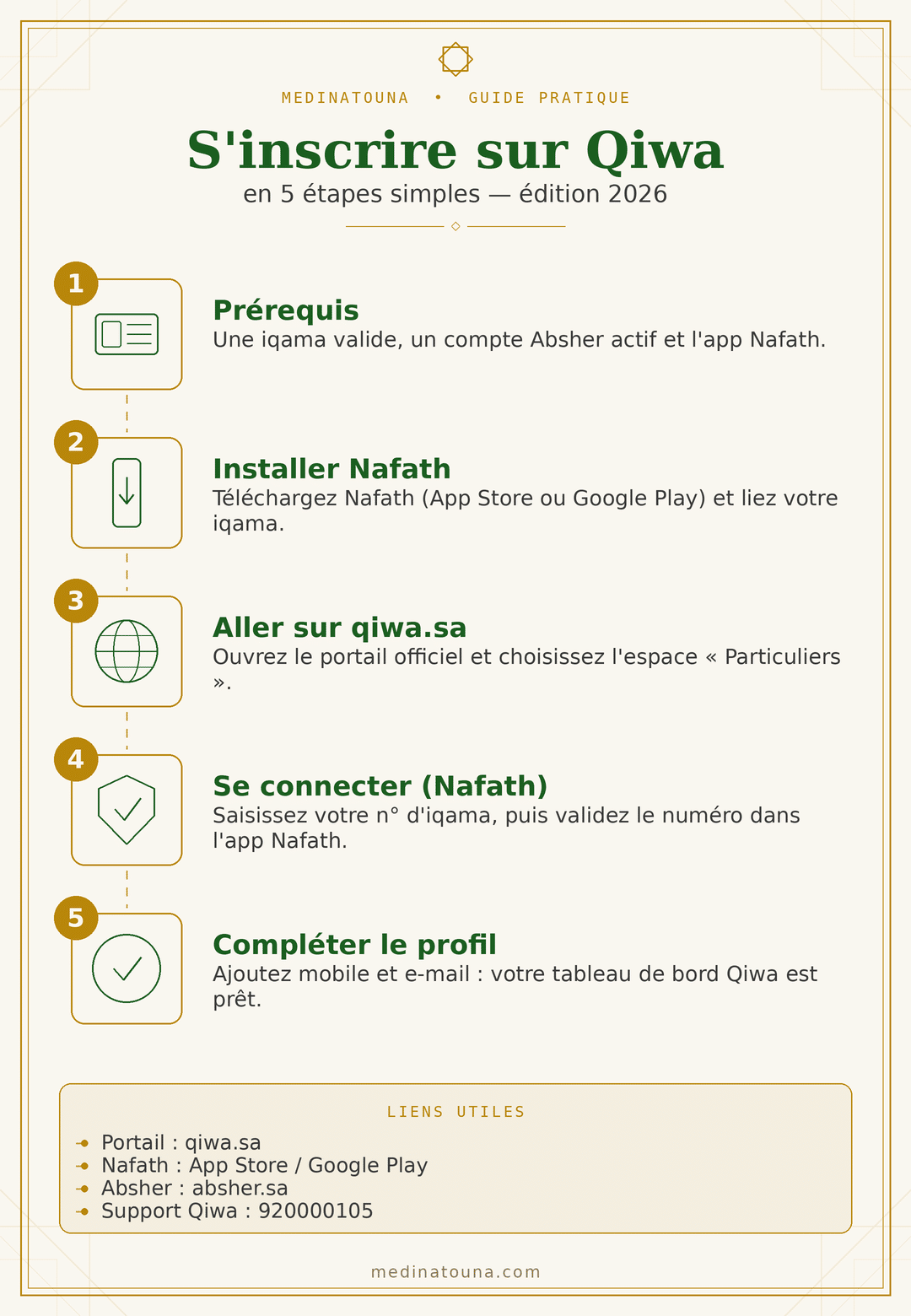
Qiwa registration: the 2026 procedure step by step
Follow the 5 steps below. Each link opens directly to the official website or application: you can complete the process without leaving the article.
Step 1 — Gather the prerequisites
First of all, you need a valid iqama, A active Absher account and the application Nafath. 👉 Check/activate Absher: absher.sa
Step 2 — Install and activate Nafath
Download the official app Nafath (edited by the National Information Center), then link it to your iqama. 📱 Download Nafath:
⚠️ Do not install Nafath and Qiwa that from these official links. Fake applications are circulating: never enter your iqama anywhere else.
Step 3 — Open the Qiwa portal
Go to the official website and choose the space «"Individuals"». 🌐 Access Qiwa: qiwa.sa
Step 4 — Connect via Nafath
On Qiwa, enter your iqama number, choose authentication Nafath, Then open the Nafath app and confirm the number displayed on the screen. (An alternative using a one-time code via Absher may be offered.)
Step 5 — Complete your profile
Enter your mobile number and your e-mail to receive notifications. You then access your individual dashboard : contracts, work permits, transfers.s.
⚠️ Outdated method: The outdated guides described registration via email and password created on Qiwa. This is no longer the primary method in 2026: identity is now verified by Nafath, which avoids the need to manage a separate password.
Services available after registration
Once logged in, you can, among other things:
- consult your individual file and your employment history;
- consult, accept, refuse or modify an employment contract;
- follow the validity of your work permit ;
- ask or follow a transfer to another employer ;
- follow a career change on the iqama;
- access certificates (saudization, attestations) and complaints.
🔗 See also: How to transfer an iqama to another employer.
Common problems & solutions (based on user feedback)
Users regularly report the following issues. Here's how to resolve them:
1. Stuck on the login page after validating in Nafath. Probable cause: browser cache or session, or outdated Nafath application. Solution: clear the cache and cookies, try a other browser or private browsing, update Nafath, Then try again. Testing from a computer often helps.
2. Account or login blocked after several attempts. Cause: Previous password login attempts. Solution: With Nafath, you no longer need a password. If your account is blocked, contact them. Qiwa support (see below); several users report unlocking within a few hours.
3. Qiwa cannot be accessed from abroad. Users are reporting access blocks outside the UK. The most reliable solution is to follow the procedure. from Saudi Arabia ; in case of an emergency abroad, contact support for options.
4. Nafath does not recognize your face. Common cause: old iqama photo (taken years ago). Solution: use the’code validation option In Nafath, rather than facial recognition, update your photo via Absher, or visit a service point.
5. Your contract or service does not appear. Most frequent cause:’employer has not finalized The process, or your data, is not correctly linked in the system. Solution: It's not necessarily your fault. Ask your employer to check the submission on the company side, and open a support ticket if necessary.
6. The portal is unavailable (maintenance). Qiwa may be offline during maintenance. Solution: try again later and, if the situation prevents an urgent action (transfer, contract), create a ticket with the support team to keep a record.
7. Beware of fake Qiwa applications. Several apps imitating Qiwa are circulating. Never seize Your iqama number or a password in an unofficial application. Only use qiwa.sa.
In case of a problem: useful contacts
- Qiwa Support: support@qiwa.sa — helpline 920000105.
- Employment dispute (salary, contract): complaints platform Madad from the ministry.
- Verification : Always confirm sensitive information on qiwa.sa And hrsd.gov.sa.
Frequently Asked Questions
- Is Qiwa reserved for Saudis? No. Saudis And Expatriates use the platform.
- Do I need to create a Qiwa password? No, in 2026 access is via Nafath (or Absher). No separate password to manage.
- Has my account already been created? The individual account is often pre-activated provided you have an active iqama. The first connection via Nafath is usually sufficient.
- Can I register without Absher or Nafath? It's difficult: official authentication relies on Nafath/Absher. Install and link Nafath to your iqama first.
- Does the Qiwa app still exist? The old app was removed from the Play Store in 2024. The safest option is to use the official web portal, while being wary of imitations.
Warning : This article is for informational purposes only and does not constitute legal advice. Interfaces and procedures may change. For your specific situation, please check directly on [website/platform name]. qiwa.sa / hrsd.gov.sa.
📲 To stay up-to-date on procedures and regulations in Saudi Arabia, join our group Telegram.
Medinatouna — reliable and verified information for the French-speaking community of Medina and Saudi Arabia.