
Table of Contents Requesting a Traffic Accident Report Paying the Traffic Violation Report Fee Downloading the Traffic Accident Report Now you can easily download Absher's traffic accident report, which includes these 3 details, for a minimal fee. This report will show all traffic accidents that occurred within the last 2 years.
- Traffic accident number.
- Date of the traffic accident.
- Car registration number.
- How to claim insurance in case of a car accident?
Request for a traffic accident report
To obtain the traffic accident report containing 3 of your essential details from Absher;
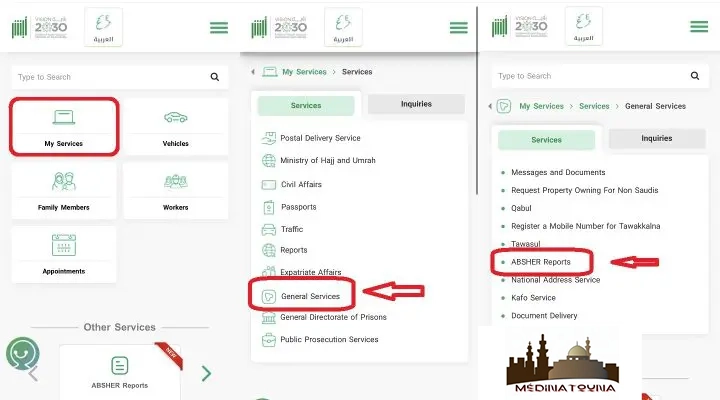
- Log in to https://www.absher.sa/
- Click on the "Services" option.
- Select the "General Services" option.
- Click on the "Absher Reports" button.
- Request the traffic accident report
Absher will open a page containing 3 options;
- Click on "Request a report".
- Select "Traffic Accidents" from the options.
- Select the language "English".
- Click the "Next" button.
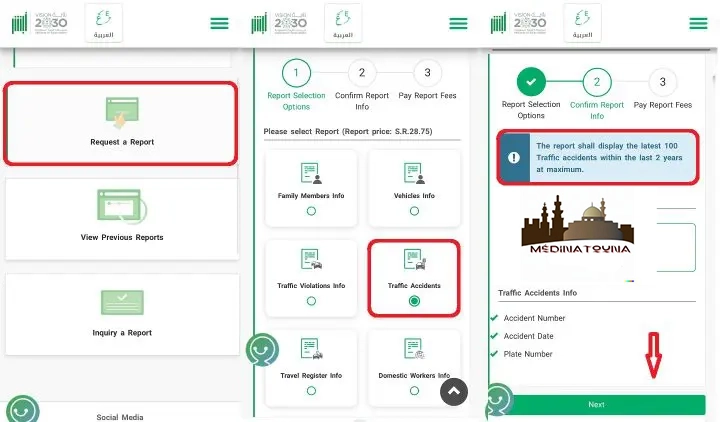
Pay the traffic violation report fee You now need to pay a fee to download the traffic accident report from Absher. The price to download the traffic accident report from Absher is 28.75 SR.

- Pay the traffic violation report fee
Download the traffic accident report
After paying the traffic accident report fee, you can print it from Absher;
- Log in to https://www.absher.sa/
- Click on the "Services" option.
- Select the "General Services" option.
- Click on the "Absher Reports" button.
- Click on "View previous requests".
- Select the report and click the "View" button.
- The next page will display the vehicle information report on your screen, which you can download or print.
- If you have received such a report from someone, you can also check/verify the Absher report.
- Download the traffic accident report

To get all the latest news, please join our Telegram group. CLICK HERE