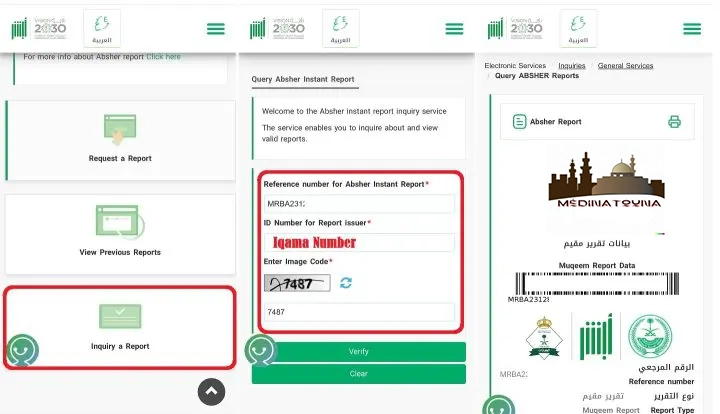

If someone sends you an Absher report, you can quickly review or control it using the "Query Absher Report" feature. Absher allows you to request and download 11 reports containing critical information about the Iqama holder.
- Family member information report.
- Vehicle information report.
- Traffic offence information report.
- Traffic accident report.
- Travel log information report.
- Information report on domestic workers.
- Road traffic accident settlement report.
- Traffic offence settlement report.
- Muqeem Report.
- Criminal record report.
- Visitor report.
Requirements
You need the following to verify and check an Absher report:
- Active Absher account.
- Absher report reference number.
- Iqama number of the person who requested the report.
Report reference number
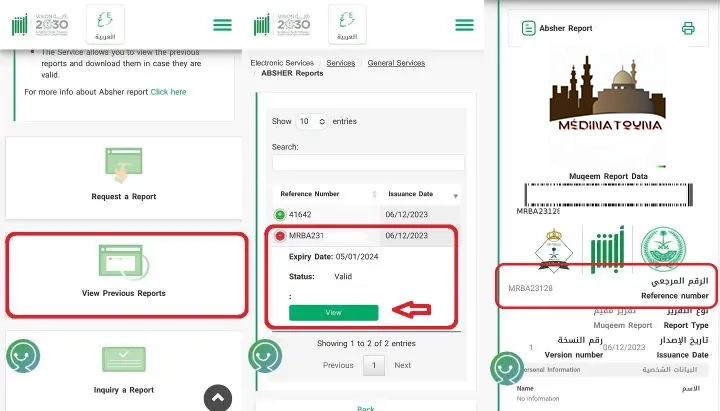
The person who requested the report on Absher can verify their reference number in this way:
- Log in to https://www.absher.sa/
- Click on the "Services" option.
- Select the "General Services" option.
- Click on the "Absher Reports" button.
- Click on "View previous requests".
- Select the report and click the "View" button.
- The next page will display the report where you can find the reference number.
Check an Absher report
To verify or check an Absher report,
- Log in to https://www.absher.sa/
- Click on the "Services" option.
- Select the "General Services" option.
- Click on the "Absher Reports" button.
- Click on "Query a report".
- Enter the reference number obtained in the previous step.
- Enter the Iqama number of the Absher account that requested this report.
- To get all the latest news, please join our Telegram group. CLICK HERE